 English
Xero Projects adds time, costs, quotes and project profitability to Xero, and for service businesses it is often all they need. Contractors buy more than they bill by the hour, so this guide looks at it from a contractor’s side: what Xero Projects does, what it costs in each region, what happens to a purchase order, and how to cover the parts a contractor usually needs on top.
Summary in 60 seconds
Xero Projects is a good fit for labour-led jobs and small works where you invoice time and materials: the time tracking, quoting and invoicing are strong, and the profitability dashboard shows budget against actual. For jobs with significant purchasing, plan for one addition: purchase orders cannot yet be linked to projects, so what is ordered but not yet billed is not on the project, and there is no documented forecast of cost at completion. Many contractors keep Xero as the ledger and add a job cost layer for budgets, purchasing and forecasts.
What Xero Projects does
Projects lets you create a project against a contact, add an estimate with estimated tasks, expenses and time, and turn it into a quote. You can track time with a timer or the mobile app, assign bills, spend money and expense claims to a project, and invoice time and costs – fixed price or time and materials, including deposits and progress payments. The profitability dashboard compares costs with the budget, and there are Project Summary, Project Details and Project Financials reports.
Two limits come up repeatedly on Xero’s own ideas forum: expenses cannot be assigned to individual tasks, and estimated expenses do not appear in the project summary until actual costs exist. Both are forum statements, so check whether they still apply.
Setting up Xero Projects for contract work
- Create the project from the estimate and keep the original estimate unchanged; record changes as separate tasks or a separate project so they can be evidenced.
- Use tasks for labour phases (installation, commissioning, project management) with the hours estimated – that is where Projects is strongest.
- Assign every bill line to the project at entry, and add a tracking category for the cost type if you want a split by cost type.
- Invoice progress or deposits from the project, and keep a separate record of retention.
- Keep a list of open POs and subcontracts per job and add it to the project figures when you review the forecast.
What it costs
| Region | Plan that includes Projects | Price per month | Extra Projects users |
|---|---|---|---|
| UK | Ultimate (10 people) | £70 ex VAT | £5 |
| Australia | Ultimate 10 | A$143 | A$7 |
| New Zealand | Ultimate (10 people) | NZ$135 ex GST | NZ$7 |
| US | Established | $97 | Billed monthly; price not stated |
In every region Projects sits in the top plan. For a small firm moving from a mid-tier plan to get Projects, the step-up is part of the cost of the decision.
What happens to a purchase order
Take a £560,000 HVAC fit-out run in Xero. The ductwork supplier has an open order for £30,000, delivered in parts. Based on Xero’s documentation, this is what happens to it:
Xero’s purchase order flow lets you create a bill from an approved PO for the quantity received, and the PO stays open for the rest. PO lines can carry tracking categories. What Xero does not yet support is assigning PO lines to a project; its latest reply on the request (February 2026) was that there is no timeframe. Across the whole example job, that means £79,600 of open orders and subcontracts sit outside the project view, which shows £379,820 against a final cost the project manager expects to be £527,980.
Tracking categories as an alternative
Many Xero users skip Projects and use tracking categories instead: one category for the job, another for department or cost type. It works on every plan, and tracking can be set on PO lines, so open POs can at least be listed per job. Users report limits on the number of active categories – check Xero Central for your organisation. Tracking categories answer “what has this job cost?”; on their own they do not answer “what will it cost?”.
What contractors should plan for
| Area | What Xero documents | What to plan for |
|---|---|---|
| Time and billing | Timer, tasks, chargeable and non-chargeable time; invoicing of time and costs, deposits and progress payments. | A strong fit for labour-led work. |
| Estimates and quotes | Estimated tasks, expenses and time per project; quotes from the project; budget vs actual on the profitability dashboard. | Budget sits at project, task and expense level – not per cost code. |
| Costs on the project | Bills, spend money and expense claims can be assigned to a project. | Costs appear when the bill is entered. |
| Purchase orders | POs with approval, part-billing by quantity received, and tracking categories on PO lines. | PO lines cannot yet be assigned to a project (Xero, Feb 2026: no timeframe). |
| Forecast at completion | Not documented. | Build it from actuals, open POs and remaining cost. |
| Retention | Not native; Xero suggests a negative invoice line (May 2024). | Track retention held and due separately. |
Retention deserves a note. In the UK, retention is often 5% – the average in the government-commissioned Pye Tait review was 4.8% – with half released at practical completion and the rest after the defects period. On the example job, 5% of the £362,000 billed so far is £18,100 held by the main contractor: earned, but not cash. In New Zealand retention must by law be held on trust; in Australia the rules differ by state. Xero has said native retention is not planned, so contractors track it separately.
Connected budgets, purchasing and expected profitability with Xero
ProfitTracker adds a connected process on top of Xero: budget per job and budget line, purchase orders raised on the job, goods receipts per line, and expected profitability as planned + committed + incurred = forecast against the budget, with forecast margin against target across all jobs.
Projects, customer invoices and credit notes are created in ProfitTracker and transferred to Xero. Customers, suppliers, contact persons, products and payments sync both ways, and hours are fetched from Xero. The sync runs nightly and whenever you start it. Xero stays the ledger.
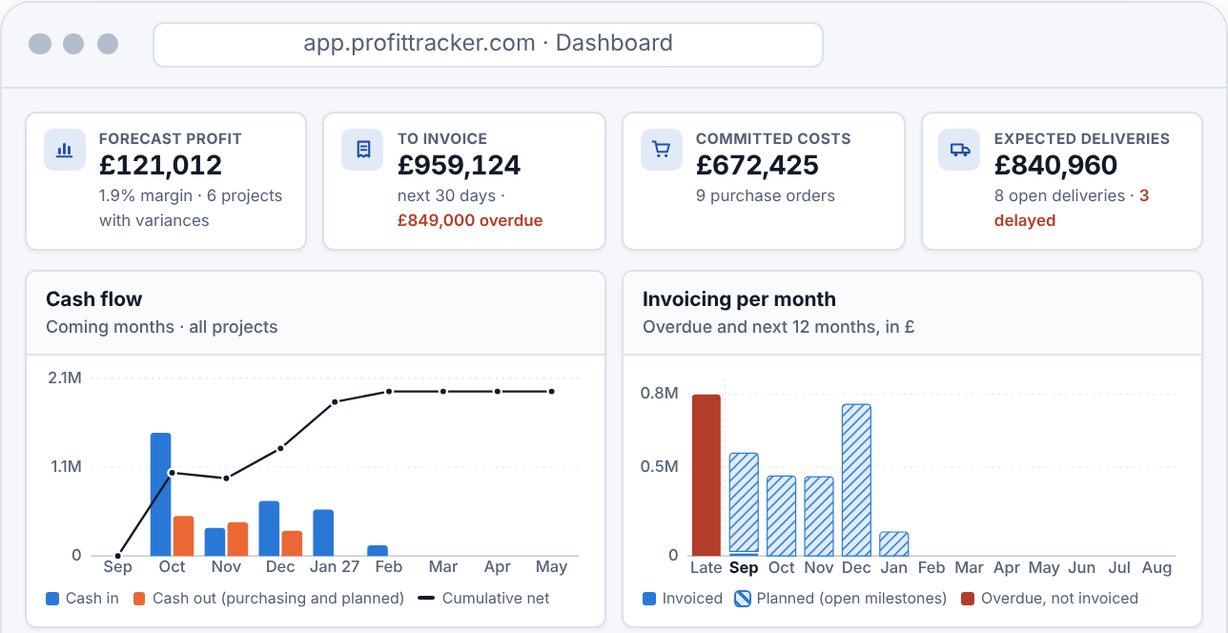
Want to see purchasing and expected profitability on your own jobs, with Xero as the ledger?
Sources
- Xero – Projects (AU)
- Xero – Projects (US)
- Xero – UK pricing
- Xero – AU pricing
- Xero – NZ pricing
- Xero – US pricing
- Xero – Purchase orders
- Xero ideas – POs on projects
- Xero ideas – part-receive POs
- Xero ideas – expenses on tasks
- Xero ideas – estimated expenses in summary
- Xero ideas – retention on invoices
- Xero – OpenAPI specification (Projects)
- Designing Buildings – retention
- MBIE – NZ retention money