 English
 Dansk
 Deutsch
 Español
 Norsk bokmål
 Svenska
PowerOffice Go has a tidy project module with subprojects, budgets per account and a project dashboard, and it can post labour costs to projects as you go. This article covers what PowerOffice Go offers a building services contractor, how best to use the completion rate and budgets, and how to track purchasing and committed costs on a live project.
Projects, subprojects and budgets
A main project in PowerOffice Go can have one level of subprojects beneath it, and each subproject can either inherit settings or have its own, including its own invoicing method (hours, hours and costs, fixed price or non-billable) and its own budget. For an installer that is practical: the contract work can be fixed price, while changes are invoiced on time and materials in a separate subproject.
The budget can be set up simply, with revenue, cost of goods, payroll costs and other operating costs, or per account. Hours, hourly rates and billable hours can all be budgeted. The project dashboard shows the invoicing rate, revenue, costs and profit, with tabs for hours, purchases, invoices, the income statement, the budget and subprojects.
Labour costs posted as you go
PowerOffice Go has a cost price per employee, which can include wages, employer’s National Insurance contributions, holiday pay and a mark-up. Approved hours can be accrued to the project (debit with project and department, credit without), manually or automatically, weekly or monthly. The net effect in the accounts is zero, but the project carries labour cost in step with the hours rather than when payroll runs. That is good practice.
Even so, the cost price is only as good as what goes into it. A fitter on a monthly wage of NOK 52,000 costs around NOK 810,000 a year with holiday pay (12%), occupational pension (2%) and employer’s contributions (14.1%). Spread over 1,640 productive hours that is just under NOK 500 an hour; over 1,380 hours, closer to NOK 590. How many hours can actually be charged to projects moves the hourly cost more than the annual pay settlement does.
Completion rate and financial percentage of completion
The project report in PowerOffice Go has a column for completion rate as a percentage, and the degree of completion can be set on the project. The help centre does not say how the figure is calculated, so check how it is set in your company before you use it as a measure of progress.
Whatever it is based on, you should know how it differs from the percentage of completion in the accounts. Under NRS 2, the main method is costs incurred divided by forecast total costs, including materials and subcontracts. Take a project where 1,420 of 1,750 estimated installation hours have been used: 81% of the budget. But the project manager expects 2,020 hours in total, so installation is only 70% complete. With equipment, materials and subcontracts included, the financial percentage of completion may be a third figure again. A progress rate measured against budget rather than forecast total looks further along than it is when the project is running over, and takes profit too early.
Changes in a separate subproject
Subprojects give you a practical way to keep changes apart, as bokføringsforskriften (the Norwegian Bookkeeping Regulations) requires when changes are material. A setup that works: the contract work as one fixed-price subproject, and each change, or all change work together, as a separate subproject on time and materials or at an agreed price. Hours and costs on the change can then be documented to the client, and invoicing is independent of the main contract.
Under the Norwegian standard contracts NS 8405 and NS 8407, the contractor must give notice without undue delay when an instruction comes in some form other than a written change order, such as a drawing revision. So register the change when it is notified, not when it is approved, and show it as two figures: what has been approved, and what has been claimed but not agreed. A project with NOK 304,000 in forecast profit and an open claim of 120,000 has an outcome range of NOK 304,000–424,000.
Purchasing and committed costs
The report “Prosjektinnkjøp” (project purchases) sets posted entries on the project against the budget; automatic costs such as payroll runs, depreciation and hours are left out. PowerOffice Go has no built-in purchase orders or goods receipts; for stock and logistics, PowerOffice recommends integrations from its marketplace, where there are several solutions. Costs that are ordered but not invoiced therefore have to be tracked in the solution you use for purchasing, and added to what has been posted.
| Event | How PowerOffice Go can handle it | What needs manual follow-up | What ProfitTracker can add |
|---|---|---|---|
| Insulation is let for 336,000 against a budget of 300,000 | The cost reaches the project when the invoices are posted, and shows against the budget in the Prosjektinnkjøp report. | The −36,000 variance until the first invoice is posted. | The contract as a purchase order on the budget line: the variance shows the same day. |
| The customer approves a change of 78,000 | The change can be set up as a separate subproject with its own invoicing method and budget. | New contract sum and an adjusted budget on the materials line. | The change as a separate sales order with milestones, and a new amount on the budget line. |
| A drawing revision creates extra work; the change is notified | The hours go on the project or subproject when they are logged. | The 120,000 claim is notified but not agreed: status and deadlines. | Approved changes as sales orders. Open claims still need manual follow-up. |
| Call-off 3 of ductwork is delayed by two weeks | Deliveries and orders are tracked outside PowerOffice Go, often in a connected solution. | New delivery date and what it means for progress and payments. | Expected delivery date per purchase order; the cash flow moves with it. |
Cost forecast and purchase commitments with PowerOffice Go
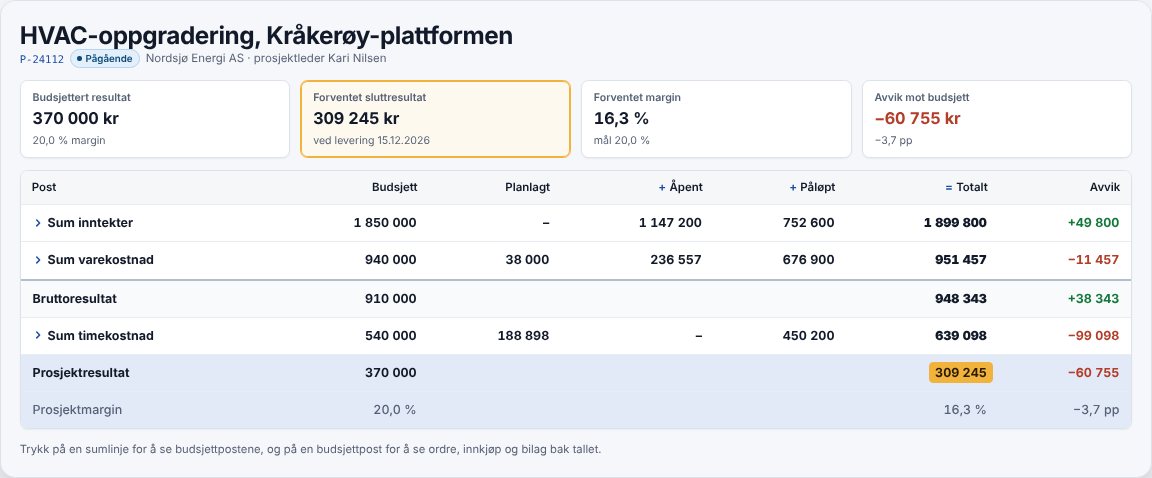
ProfitTracker adds purchasing and forecasting on top of PowerOffice Go. A purchase order is created on the project and the budget line, and the amount shows as Committed from when the order is approved or sent until the invoice is posted. The Profitability tab shows Planned + Committed + Actual against budget per line, for revenue, cost of goods and labour cost.
Projects, customer invoices and credit notes are created in ProfitTracker and transferred to PowerOffice Go. Posted entries on the project accounts, hours and payment status are fetched every night and when you press “Synchronise now”. The accounts stay in PowerOffice Go.
Checklist
- Can the project manager see committed costs, not just posted ones?
- Can budget, forecast and variance be tracked per line?
- Are changes registered when they are notified, with a status?
- Are the invoicing plan and expected receipts visible per project?
- Are the accounts still the source for everything posted?
Want to see purchasing and cost forecasts on your own projects, with PowerOffice Go as your accounting software?
Sources
- PowerOffice – create a project
- PowerOffice – projects and subprojects
- PowerOffice – project budget
- PowerOffice – budget per account
- PowerOffice – budgeting hours
- PowerOffice – project dashboard
- PowerOffice – project report
- PowerOffice – project purchases
- PowerOffice – accruing hours
- PowerOffice – products and stock
- PowerOffice – extensions, stock and logistics
- CMS – changes in construction contracts
- Skatteetaten – employer’s contributions 2026